


.png)
.png)



Not every visitor to your website is the same. Some may be new visitors, while others may already be customers or returning leads. HubSpot Content Hub includes Smart Content features that allow businesses to display different content to different audiences.
Smart content uses personalization rules based on visitor data, allowing websites to adapt messaging depending on who is viewing the page.
Understanding how HubSpot Content Hub smart content and personalization rules work helps businesses create more targeted and relevant website experiences.
What Is Smart Content?
Smart Content allows sections of a webpage to change dynamically depending on specific rules.
Instead of showing identical content to every visitor, smart content can adjust based on factors such as:
- Visitor location
- Device type
- Contact list membership
- Lifecycle stage
- Referral source
This helps tailor the website experience for different audiences.
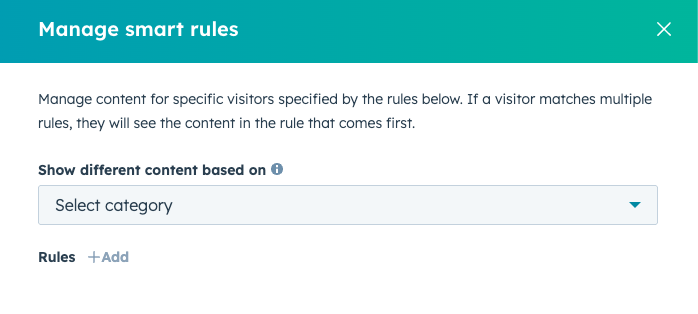
How Smart Content Works
Smart content works by defining rules that determine which version of content should appear.
For example:
- Visitors from the United States may see one message
- Visitors from Europe may see another message
Similarly, returning contacts may see different CTAs than new visitors.
HubSpot automatically evaluates the rules when a visitor loads the page.
Creating Smart Content in HubSpot
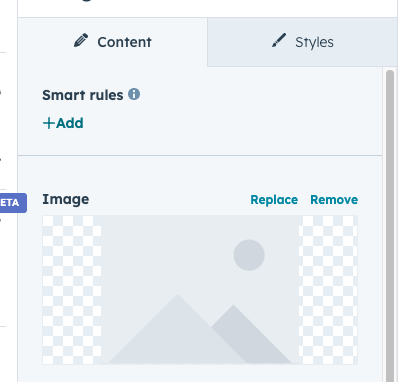
To create smart content in HubSpot Content Hub:
- Open a page in the page editor
- Select a module or section
- Click Make Smart
- Choose the rule criteria
- Create alternate content versions
Once configured, HubSpot automatically displays the correct version for each visitor.
Types of Smart Content Rules
HubSpot supports several types of rules that control how content is personalized.
Common rule types include:
Contact List Membership
Content can change depending on whether a visitor belongs to a specific list.
  Example:
Customers may see support resources, while prospects may see product demos.
Lifecycle Stage
Messaging can be customized depending on the stage of the customer journey.
Example:
- Leads may see educational resources
- Opportunities may see product comparison pages
Geographic Location
Content can adapt based on the visitor’s country or region.
Example:
- Region-specific offers
- Local event promotions
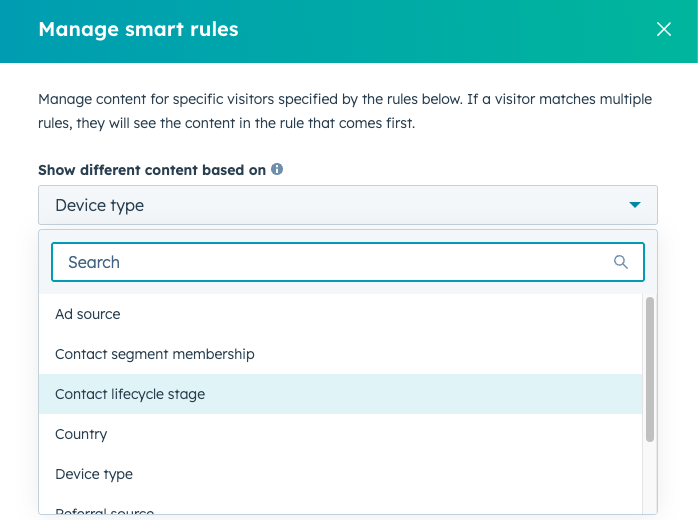
Device Type
Content can also adapt depending on whether a visitor is using:
- Desktop
- Tablet
- Mobile device
This helps optimize experiences for different screen sizes.
Key Takeaway
HubSpot Content Hub smart content allows businesses to personalize website sections based on visitor data and behavior. By creating content variations and applying rules, teams can deliver more targeted messages that improve engagement and conversions.
Related Post
How Do HubSpot Content Hub Personalization Tokens Work?
Personalization is an important feature in modern marketing. Instead of showing the same content to every visitor, businesses can tailor messages based on user information. HubSpot Content Hub supports personalization tokens which allow dynamic...
How Do HubSpot Content Hub Custom Modules and Reusable Components Work?
One of the most powerful features of HubSpot Content Hub s the ability to create custom modules. Custom modules allow developers to build reusable content blocks that editors can easily add to pages without writing code.
How Do HubSpot Content Hub CTAs and Conversion Tracking Work?
Calls-to-action (CTAs) are designed to guide visitors toward taking a specific action on your website. In HubSpot Content Hub, CTAs play a key role in turning website traffic into leads, subscribers, or customers.
Have a Project in Mind?
Let’s talk about what you need and how we can make it happen.

Leave a reply