


.png)
.png)


When building custom websites in HubSpot Content Hub, developers often use HubL, which is HubSpot’s templating language. HubL allows developers to create dynamic templates, pull data from HubSpot objects, and control how content appears on pages.
HubL works alongside HTML, CSS, and JavaScript to power many of the templates and modules used in HubSpot websites.
Understanding how HubSpot Content Hub HubL works helps developers build more flexible and dynamic website experiences.
What Is HubL?
HubL stands for HubSpot Markup Language. It is a server-side templating language used to generate dynamic content inside HubSpot templates and modules.
HubL allows developers to:
- Insert dynamic content into templates
- Access CRM data
- Display lists of content
- Control logic and conditions within templates
HubL syntax is typically embedded within HTML templates.
Where HubL Is Used
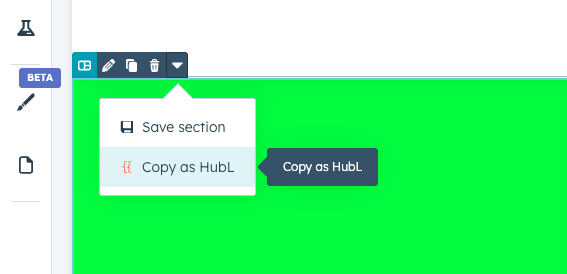
HubL is commonly used in several areas within HubSpot Content Hub, including:
- Page templates
- Blog templates
- Custom modules
- Dynamic content sections
- Theme files
Developers use HubL to control how templates render content when pages load.
Basic HubL Syntax
HubL uses a syntax that is similar to many other templating languages.
For example, variables can be inserted into templates using double curly brackets.
Example:
{{content.name}}This code can dynamically display the name of a page or content item.
Conditional Logic with HubL
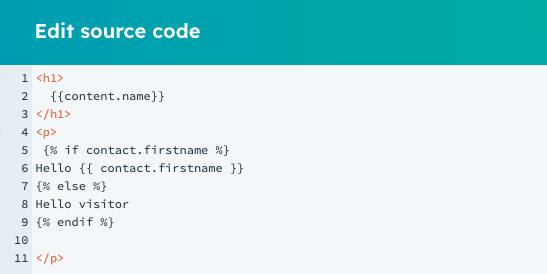
HubL allows developers to display different content depending on certain conditions.
For example, a template might show different content depending on whether a user is logged in.
Example:
{% if contact.firstname %} Hello {{ contact.firstname }} {% else %} Hello visitor {% endif %}This logic allows templates to display personalized or conditional content.
Looping Through Data
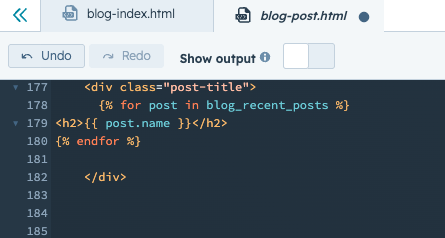
HubL also allows developers to loop through lists of data.
This is often used for displaying multiple items such as blog posts or resources.
Example:
{% for post in blog_recent_posts %}<h2></h2>
{% endfor %}
This code automatically generates a list of blog posts within the template.
Key Takeaway
HubSpot Content Hub HubL is the templating language used to create dynamic templates and modules. By combining HubL with HTML, CSS, and JavaScript, developers can build flexible website structures that automatically display content from the HubSpot platform.
Related Post
How Do HubSpot Content Hub Theme Files and Folder Structures Work?
Themes play an important role in how websites are built and managed in HubSpot Content Hub. A theme defines the overall design system of a website, including templates, styles, modules, and layout structures.
How Does HubSpot Content Hub Design Manager Work?
The Design Manager is the primary development environment within HubSpot Content Hub. It is where developers create and manage the files that control how a website looks and functions.
How Do HubSpot Content Hub Membership and Private Content Features Work?
Not all website content needs to be publicly accessible. Sometimes businesses want to restrict certain pages, resources, or knowledge bases so that only specific users can view them. HubSpot Content Hub provides membership and private content...
Have a Project in Mind?
Let’s talk about what you need and how we can make it happen.

Leave a reply