


.png)
.png)


Many businesses serve audiences in different countries and languages. To support this, HubSpot Content Hub provides multilingual website features that allow you to create and manage content in multiple languages.
Instead of building completely separate websites for each language, HubSpot allows you to link translated pages together so visitors automatically see the version that matches their language.
Understanding how HubSpot Content Hub multilingual features work helps businesses expand their reach while maintaining an organized website structure.
What Is a Multilingual Website?
A multilingual website offers content in more than one language.
For example, a website might offer versions in:
- English
- Spanish
- French
- German
Visitors can switch between languages to view the same page content translated into their preferred language.
Creating Multi-Language Pages in HubSpot
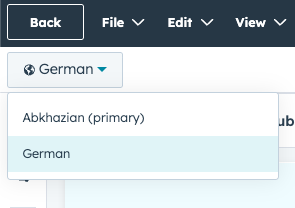
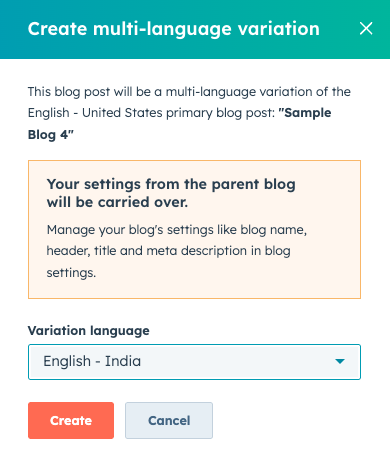
HubSpot allows you to create translated versions of existing pages.
To create a translated page:
- Open the page in the editor
- Click More → Create Multi-Language Variation
- Select the language for the new version
- Add translated content
The translated page remains linked to the original page so HubSpot knows they belong to the same group.
Language Switcher on the Website
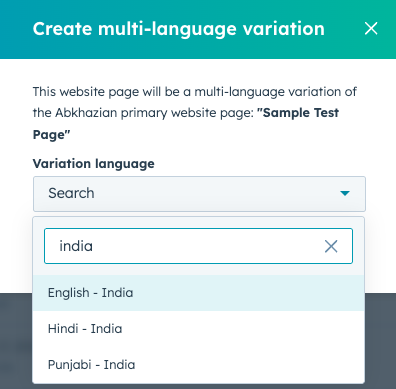
Most multilingual websites include a language switcher that allows visitors to choose their preferred language.
Developers usually add a language switcher to the website header so it appears on every page.
When visitors select a language, HubSpot automatically displays the corresponding translated page.
Managing URLs for Different Languages
Each language version of a page usually has a different URL structure.
For example:
English pageyourwebsite.com/services
Spanish versionyourwebsite.com/es/services
French versionyourwebsite.com/fr/services
This structure helps search engines understand which version of the page is meant for each language.
SEO for Multilingual Pages
HubSpot automatically supports hreflang tags, which tell search engines about the relationship between language versions of a page.
This helps search engines show the correct language version of the page to users in different regions.
For example:
- English version for users in the US
- Spanish version for users in Spain or Latin America
Proper multilingual setup can improve international search visibility.
Translating Blog Content
In addition to website pages, HubSpot Content Hub also supports multilingual blog posts.
Blog articles can be translated and linked to their original versions just like regular pages.
This allows businesses to maintain multilingual blogs without creating separate blog systems.
Managing Content Across Languages
As websites grow, managing multiple languages requires careful organization.
Many teams maintain multilingual content by:
- Translating core pages first
- Prioritizing high-traffic pages
- Maintaining consistent page structures
- Using professional translation tools or services
This helps ensure quality translations and a consistent user experience.
Key Takeaway
HubSpot Content Hub multilingual features allow businesses to create and manage websites in multiple languages without building separate sites By linking translated pages and supporting language-specific URLs, HubSpot helps businesses serve global audiences more effectively.
Related Post
Can Non-Developers Use HubSpot Content Hub?
Yes, non-developers can absolutely use HubSpot Content Hub. In fact, one of the main goals of the platform is to allow marketing teams and content editors to manage websites without needing to write code.
How Do HubSpot Content Hub Content Permissions and User Roles Work?
When multiple people work on a website, it becomes important to control who can edit content, manage design assets, or publish pages. HubSpot Content Hub provides user roles and content permissions that allow administrators to control access across...
How Do HubSpot Content Hub Content Scheduling and Publishing Calendars Work?
Publishing content consistently is an important part of maintaining an active website and effective content marketing strategy. HubSpot Content Hub provides scheduling tools and publishing calendars that help teams plan and release content at the...
Have a Project in Mind?
Let’s talk about what you need and how we can make it happen.

Leave a reply