






Your URL is one of the first things search engines and users see — yet it’s often ignored.
A poorly structured URL can hurt:
- SEO rankings
- Click-through rates
- User understanding
While a clean, optimized URL can boost visibility and trust instantly.
In this guide, you’ll learn how to create SEO-friendly URLs in HubSpot Content Hub using practical best practices.
What Is an SEO-Friendly URL?
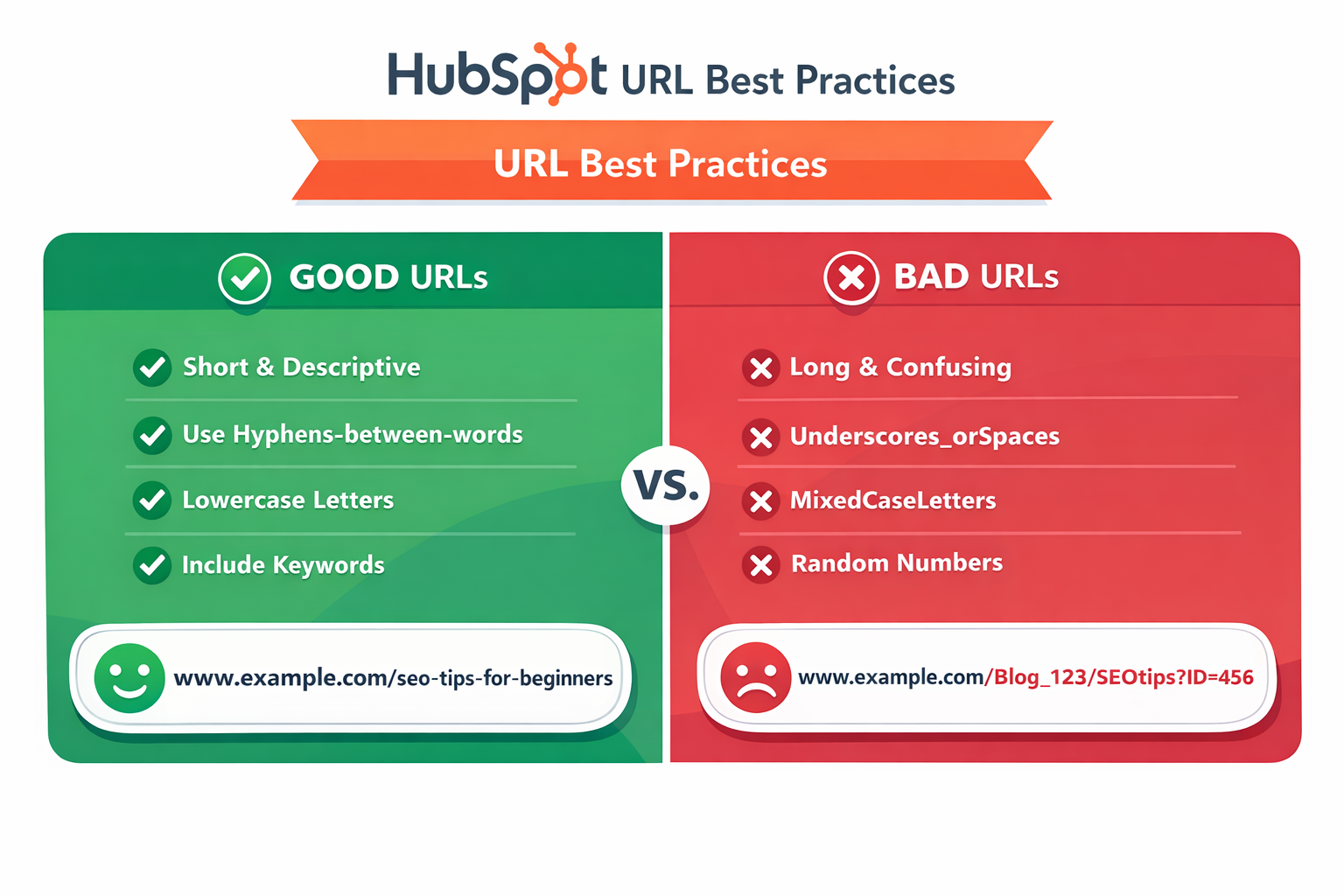
An SEO-friendly URL is:
- Short
- Descriptive
- Easy to read
- Keyword-relevant
❌ Bad URL:
example.com/page?id=12345
✅ Good URL:
example.com/hubspot-content-hub-guide
🧠 WHY URL STRUCTURE MATTERS
Search engines use URLs to:
- Understand page content
- Index pages properly
- Rank content
Users use URLs to:
- Decide whether to click
- Trust the page
👉 So URLs impact both SEO + UX
🧩 STEP 1: Set Proper URL Structure
In HubSpot:
👉 Settings → Website → Domains & URLs
Define structure like:
/blog/post-name
/resources/guide-name
/events/event-name
👉 Keep it consistent across site
🔤 STEP 2: Optimize URL Slugs
The slug is the last part:
/hubspot-content-hub-guide
Best Practices:
- Use keywords
- Use hyphens (-) not underscores
- Keep it short
- Avoid numbers unless needed
❌ Avoid:
/post-123
/my_blog_final_v2
/page?id=seo123
🔍 STEP 3: Include Target Keywords
Example:
❌ Weak:
/blog/article1
✅ Strong:
/blog/hubspot-content-hub-seo-guide
👉 Helps search engines understand context
🚫 STEP 4: Avoid Keyword Stuffing
❌ Bad:
/hubspot-content-hub-seo-guide-best-hubspot-content-hub-seo-tips
👉 Looks spammy
✅ Better:
/hubspot-content-hub-seo-guide
🔗 STEP 5: Maintain Clean Hierarchy
Example structure:
- /services/web-development
- /services/hubspot-development
- /blog/seo-guide
- /resources/free-template
👉 Helps users navigate easily
🔁 STEP 6: Handle URL Changes Properly
If you change a URL:
👉 Always create a redirect
Example:
/old-url → /new-url
👉 HubSpot automatically prompts this — use it
🧠 STEP 7: Keep URLs Stable
Changing URLs frequently:
- Confuses search engines
- Breaks backlinks
- Hurts rankings
👉 Set URL once → avoid changing later
🌍 STEP 8: Multi-Language URL Structure
Example:
/en/seo-guide
/fr/seo-guide
/es/seo-guide
👉 Helps SEO in different regions
⚡ STEP 9: Avoid Stop Words (Optional)
Words like:
- and
- the
- of
👉 Can be removed for shorter URLs
Example:
/how-to-create-hubspot-pages
→ /create-hubspot-pages
🧪 STEP 10: Check URL Before Publishing
Before publishing:
- Is it readable?
- Does it include keyword?
- Is it short?
- Is it clean?
👉 Quick check = big SEO impact
🎯 REAL-WORLD EXAMPLES
Blog:
/blog/hubspot-content-hub-guide
Resource:
/resources/hubspot-migration-checklist
Directory:
/schools/delhi-public-school
⚡ PRO TIPS
- Keep URLs under 60 characters
- Use lowercase only
- Avoid special characters
- Match URL with page title
🚀 COMMON MISTAKES
- ❌ Changing URLs after publishing
- ❌ Using random slugs
- ❌ Ignoring redirects
- ❌ Overloading with keywords
📌 Key Takeaway
SEO-friendly URLs in HubSpot Content Hub should be clean, keyword-focused, and consistent. A well-structured URL improves both search visibility and user experience, making it easier for people and search engines to understand your content.
Have a Project in Mind?
Let’s talk about what you need and how we can make it happen.

Leave a reply