


.png)
.png)



Many businesses serve audiences across different countries and languages. To support global visitors, HubSpot Content Hub includes multi-language website features that allow teams to create translated versions of pages and blog posts.
These tools help organizations deliver content in different languages while maintaining a consistent website structure.
Understanding how HubSpot Content Hub multi-language website features work helps businesses expand their reach and provide localized experiences for international audiences.
What Is a Multi-Language Website?
A multi-language website provides the same content in different languages so visitors can access information in their preferred language.
For example, a website might offer pages in:
- English
- Spanish
- French
- German
Visitors can switch between language versions using a language selector on the website.

Creating Multi-Language Pages in HubSpot
HubSpot allows users to create translated versions of existing pages.
To create a language variation:
- Open a page in the editor
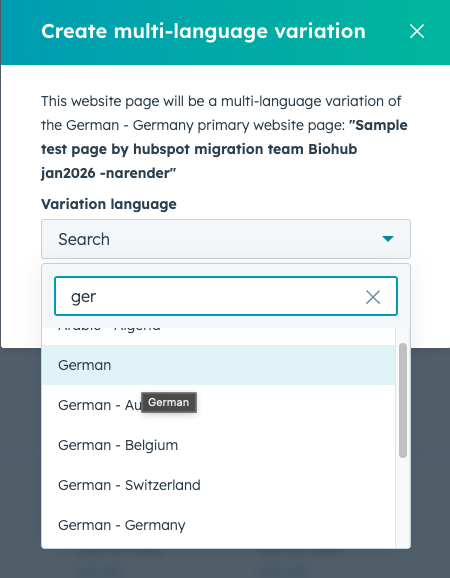
- Click Create multi-language variation
- Select the language you want to add
- Translate the content
- Publish the translated version
HubSpot automatically groups these versions together as part of the same page.
Multi-Language URL Structure
Translated pages typically use different URL structures to identify each language.
Examples include:
example.com/en/page-name
example.com/es/page-name
example.com/fr/page-name
This structure helps search engines understand which language version is being displayed.
Language Switchers
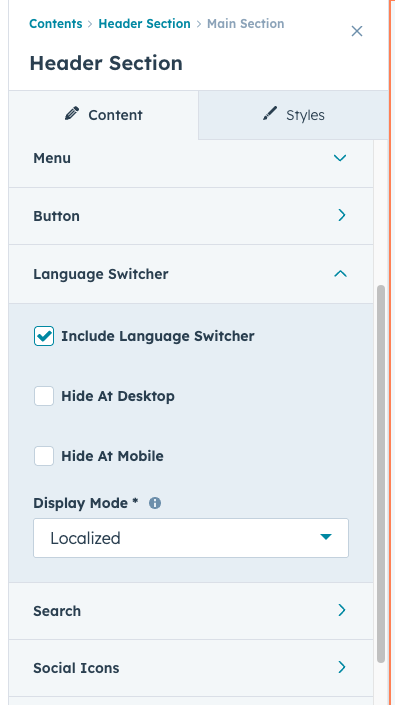
Many multi-language websites include a language switcher that allows visitors to change languages easily.
Language switchers may appear in:
- The website header
- The footer
- Navigation menus
Visitors can select their preferred language and view the corresponding version of the page.
Key Takeaway
HubSpot Content Hub multi-language features allow businesses to create translated versions of pages and blog posts while maintaining a structured website. By organizing language variations and implementing language switchers, teams can provide a localized experience for visitors across different regions.
Have a Project in Mind?
Let’s talk about what you need and how we can make it happen.

Leave a reply