


.png)
.png)

.png?width=1400&height=1050&name=A%20Step-by-Step%20Guide%20to%20Setting%20Up%20Lead%20Scoring%20in%20HubSpot%20(3).png)

Introduction
Not all leads are created equal.
Some are ready to buy. Others are just browsing. And if your team is treating both the same way, you’re likely wasting valuable time — and leaving revenue on the table.
That’s where lead scoring comes in.
With HubSpot, you can set up a lead scoring model that automatically prioritizes your hottest prospects based on their fit and behavior — so your sales team focuses on leads that actually convert.
In this guide, you’ll learn:
- What lead scoring is and why it matters
- Key criteria to include
- How to set up scoring in HubSpot step-by-step
- Best practices and mistakes to avoid
What Is Lead Scoring?
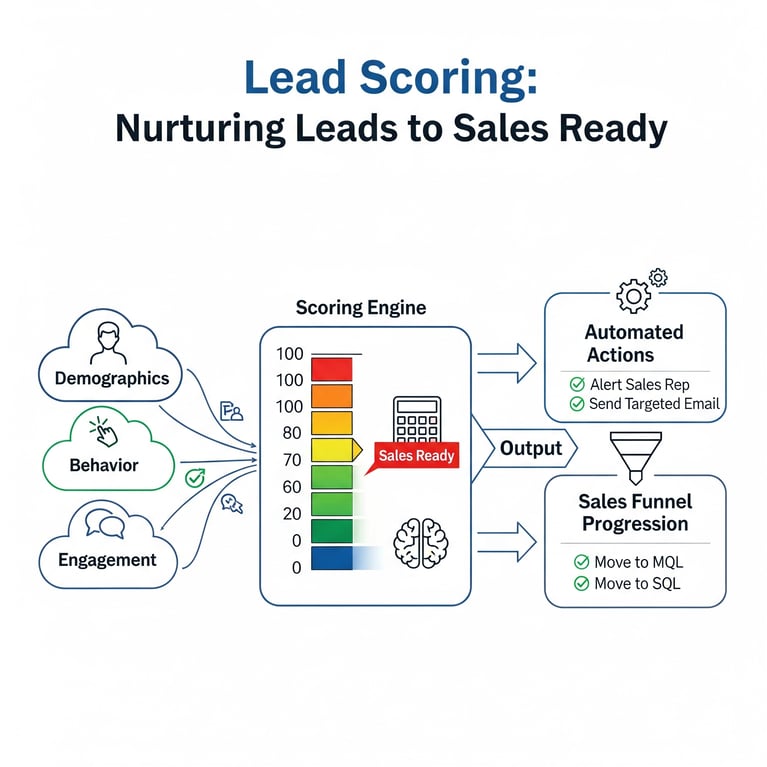
Lead scoring is the process of assigning points to contacts based on how likely they are to become a customer.
This score is based on:
- Demographic/firmographic fit (job title, company size, industry)
- Behavior (email clicks, page views, form submissions)
- Engagement (recent activity, downloads, webinar attendance)
Once a lead reaches a certain score threshold, you can:
- Automatically alert or assign a rep
- Move them to the next funnel stage (e.g., MQL → SQL)
- Trigger a specific nurture or outreach sequence
HubSpot uses a default property called HubSpot Score — a flexible system you can customize based on your funnel.
Benefits of Lead Scoring
- Focus sales on the best-fit leads
- Reduce lead response time
- Avoid wasting time on poor-fit contacts
- Improve conversion rates from MQL to SQL
- Track lead quality trends over time
Proper lead scoring aligns marketing and sales and creates a more efficient revenue engine.
Example: HubSpot Lead Scoring in Action
Example Contact: Sarah, VP of Marketing
- Downloaded your strategy guide (+10)
- Visited your pricing page twice (+24)
- Company size = 150 employees (+10)
- Used work email (+5)
- Opened 3 nurture emails (+6)
Total Score: 55 → Sales team is alerted at 60
→ One more action (like a demo request) could push Sarah over the threshold and trigger handoff.

Common Lead Scoring Mistakes to Avoid
- Using only behavioral criteria (ignore fit)
- Giving every form submission equal weight
- Not subtracting points for poor-fit signals
- No alignment with sales on what score = qualified
- Failing to test or optimize regularly
Lead scoring is most powerful when it's tied to real outcomes — not just activity.

Bonus: Use Multiple Score Properties (Pro Tip)
For advanced users, you can create custom score properties for:
- Partner leads
- Specific campaigns
- Product trials
- Channel attribution
Then use those to influence automation, segmentation, and reporting.
Final Thoughts
Lead scoring in HubSpot is one of the highest ROI features you can set up.
When done right, it helps you:
- Focus sales on high-potential contacts
- Qualify leads more accurately
- Reduce manual sorting
- Improve lead-to-customer conversion rates
Don’t let good leads slip through the cracks — use scoring to guide your team toward the best opportunities.
You might also like
How to Build a Lean, Scalable Sales Funnel with HubSpot
Streamlining Your Sales Funnel for Growth with HubSpot Sales funnels are not new — but the way modern businesses design, measure, and scale them has changed dramatically.
How to Set Up Lifecycle Stages in HubSpot and Why They Matter ?
Setting Up Lifecycle Stages in HubSpot: What They Are and Why They Matter Most businesses have leads at every stage of the customer journey, ranging from the first time someone visits your website, to marketing qualified leads (MQLs) who’ve shown...
What Is a HubSpot Lifecycle Stage? And Why You Should Care
Introduction One of the most powerful — but often overlooked — features in HubSpot is the Lifecycle Stage property. Whether you’re in marketing, sales, or client services, understanding lifecycle stages can completely transform how your team manages...
Have a Project in Mind?
Let’s talk about what you need and how we can make it happen.
