


.png)
.png)

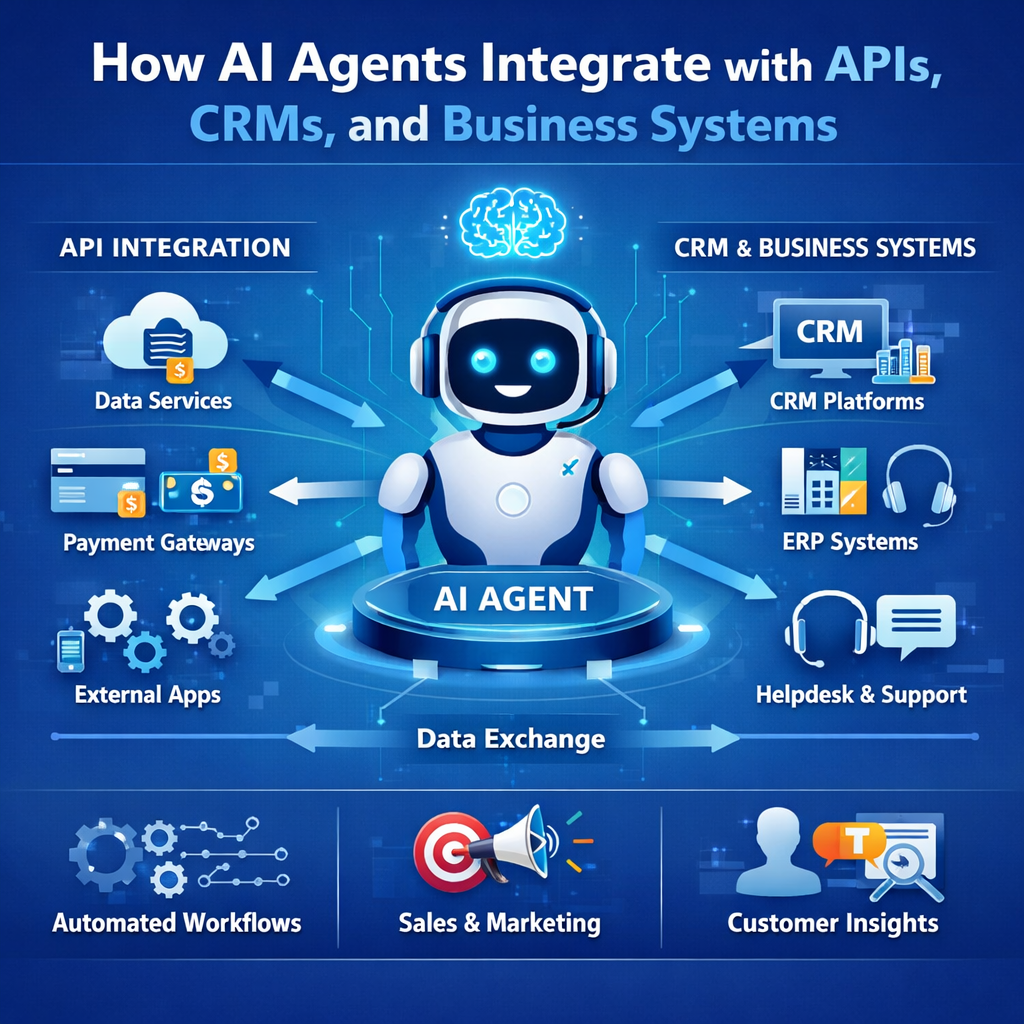

Most AI agents look good in isolation.
They can:
- understand input
- generate responses
- even simulate decision-making
But the real test is simple:
Can they actually work inside your business systems?
Because that’s where value is created.
Not in responses.
But in:
- actions
- workflows
- system updates
And that only happens through integration.
The Reality: Without Integration, AI Agents Are Just Demos
An AI agent without integration can:
- answer questions
- generate insights
But it cannot:
- update your CRM
- trigger workflows
- fetch real-time data
- complete tasks
Which means:
- users still need to act manually
- workflows remain unchanged
This is why many AI implementations feel underwhelming.
They stop at intelligence.
They don’t reach execution.
What Integration Actually Means
Integration is not just connecting an API.
It’s enabling the agent to:
- read data from systems
- understand context
- make decisions
- take actions
- update records
- trigger workflows
In other words:
integration turns AI into an operational system.
The Systems AI Agents Typically Integrate With
In most business environments, agents interact with a combination of systems.
1. CRMs (Like HubSpot)
This is one of the most common integrations.
Agents can:
- read contact and deal data
- analyze activity and engagement
- update properties
- create tasks
- trigger workflows
CRMs provide:
- structured data
- defined processes
Which makes them ideal for AI agents.
2. APIs (Internal and External)
APIs allow agents to:
- fetch additional data
- send information to other systems
- trigger actions outside the CRM
Examples:
- enrichment APIs
- product usage data
- billing systems
- third-party services
This expands what the agent can do.
3. Internal Tools and Databases
Many workflows depend on:
- internal dashboards
- proprietary systems
- databases
Agents can:
- query data
- combine context
- update internal records
This is often where the most valuable signals exist.
4. Communication Platforms
Agents often need to interact with teams.
Common integrations include:
- Slack
- email systems
- notifications
They can:
- send alerts
- trigger follow-ups
- notify stakeholders
5. Support Systems
For customer support workflows, agents integrate with:
- helpdesk platforms
- ticketing systems
They can:
- classify tickets
- route queries
- update status
How Integration Actually Works (In Practice)
A typical integration flow looks like this:
Step 1: Trigger
Something happens:
- new lead created
- ticket received
- activity updated
- API event triggered
Step 2: Data Collection
The agent gathers:
- CRM data
- activity history
- external signals
- relevant context
Step 3: Decision
The agent:
- interprets the data
- evaluates conditions
- decides what needs to happen
Step 4: Action
The agent interacts with systems:
- updates CRM fields
- creates tasks
- triggers workflows
- sends notifications
- calls APIs
Step 5: Output
The system:
- records the action
- returns results
- logs the activity
This is very different from:
- input → response
It’s:
input → decision → action → system update
Where Integrations Usually Break
Most integration issues are predictable.
1. Treating Integration as a Final Step
A common approach is:
- build the AI first
- add integrations later
This leads to:
- redesign
- unexpected complexity
- inconsistent behavior
Integration should be part of the design from the beginning.
2. Poor Data Mapping
If data is:
- inconsistent
- incorrectly mapped
- missing key fields
…the agent:
- misinterprets context
- produces weak outputs
3. API Failures Not Handled
In real systems:
- APIs fail
- responses are delayed
- data is incomplete
Without handling this:
- workflows break
- actions fail
4. No Clear Action Design
Many agents:
- fetch data
- generate insights
But don’t clearly define:
- what action to take
- how to update systems
This limits impact.
5. Overloading a Single System
Trying to:
- push all logic into CRM workflows
- or centralize everything in one system
creates:
- complexity
- maintenance issues
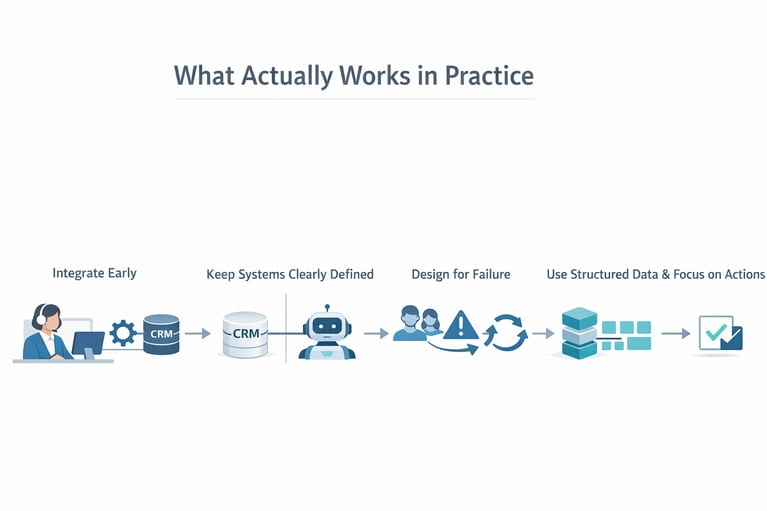
What Actually Works in Practice
From what we’ve seen, effective integrations follow a few principles.
Content Tag
Content Title
Integrate Early
Don’t treat integration as an afterthought.
It’s where:
- real challenges appear
- real value is created
Keep Systems Clearly Defined
Define:
- what the agent does
- what the CRM handles
- what APIs provide
- what humans control
Clear boundaries reduce complexity.
Design for Failure
Assume:
- APIs will fail
- data will be missing
- responses will vary
Include:
- retries
- fallbacks
- escalation paths
Use Structured Data Wherever Possible
Structured inputs lead to:
- better decisions
- more reliable outputs
Focus on Actions, Not Just Data
Integration is not about:
- connecting systems
It’s about:
- enabling actions
Managing customer contacts and tracking interactions.
A Practical Example
A typical integrated workflow might look like:
- new lead enters CRM
- agent pulls CRM data and activity history
- calls external API for enrichment
- evaluates lead quality
- updates CRM fields
- creates follow-up task
- sends Slack notification
- triggers workflow
This is:
- multi-system
- multi-step
- action-driven
The Bigger Insight
The biggest shift with AI agents is this:
From:
- systems that store and display data
To:
- systems that interpret and act on data
Integration is what enables that shift.
The Reality of AI Integration
AI agents don’t replace your systems.
They connect them.
They make them:
- more responsive
- more intelligent
- more proactive
But they still depend on:
- clear workflows
- reliable data
- well-designed integrations
If You’re Building Integrated AI Agents
Focus on:
- workflows first
- integration early
- actions clearly defined
- failure scenarios handled
- continuous improvement
This is what turns AI into a working system.
FAQs
Why is integration important for AI agents?
Without integration, agents can generate outputs but cannot take actions or interact with business systems.
What systems do AI agents typically integrate with?
CRMs, APIs, internal tools, databases, communication platforms, and support systems.
How do AI agents interact with APIs?
They use APIs to fetch data, send updates, trigger actions, and connect with external systems.
What is the biggest challenge in AI integrations?
Handling real-world complexity like inconsistent data, API failures, and multi-system coordination.
Can AI agents work without CRM integration?
They can function, but they rarely deliver meaningful business value without interacting with core systems.
How do you make AI integrations reliable?
By designing for failure, using structured data, defining clear actions, and monitoring system behavior.
You might also like
Receive the latest updates.
Power Up Your Project
Request a Quote and Let Us Save the Day!

Leave a reply